How to Transfer Bybit KYC to a New Account (Change Your Referral Code)
Already have a verified Bybit account but missed out on a referral bonus? This guide shows you exactly how to transfer your identity verification to a new account — without redoing KYC — and start earning 20% cashback on trading fees.
Why Transfer Your KYC to a New Account?
If you registered your Bybit account without a referral code (or with someone else's), you're missing out on trading fee rebates. Most traders don't realize this until they've already completed KYC verification.
The good news: you don't need to redo your identity verification. Bybit allows you to transfer your existing KYC to a new account — keeping your verification status while gaining access to referral benefits.
After transferring to an account with our REFEE referral code, you'll receive 20% cashback on all trading fees — automatically, forever. High-volume traders save hundreds or even thousands of dollars per month.
Requirements & Restrictions
Before starting, make sure you understand these important conditions:
- 24-hour wait after KYC — Transfer is only available 24 hours after completing verification
- Desktop recommended — Feature works best on desktop website
- 180-day cooldown — Can't transfer again for 6 months
- 24-hour withdrawal lock — After transfer completes on both accounts
- P2P 5-day restriction — Cannot transfer if P2P order closed in last 5 days
- Personal accounts only — Business KYC accounts not supported
- ✓ Identity verification (KYC) status
- ✓ Verification level (Lv. 1, Lv. 2)
- ✗ Account balance (must withdraw first)
- ✗ Email/phone number
- ✗ Referral or affiliate code
- ✗ Trading history
- ✗ Unclaimed rewards (forfeited)
- ✗ New user promotions (can't re-claim)
Prepare Your Accounts
Complete these steps before initiating the transfer:
New Account (Destination)
Old Account (Source)
Instead of withdrawing to an external wallet (which costs fees), you can use Bybit's internal transfer to send funds directly to your new account's UID after it's verified. Just wait for the 24-hour restriction to lift.
Step-by-Step Transfer Guide
Create Your New Bybit Account
First, register a new account using our referral link. This ensures the REFEE code is automatically applied.
Create Account with REFEE CodeLog Into Your Old Account
Log into your old (verified) account using a desktop browser. Click your profile icon in the top-right corner, then select "Account & Security".
Log Into Bybit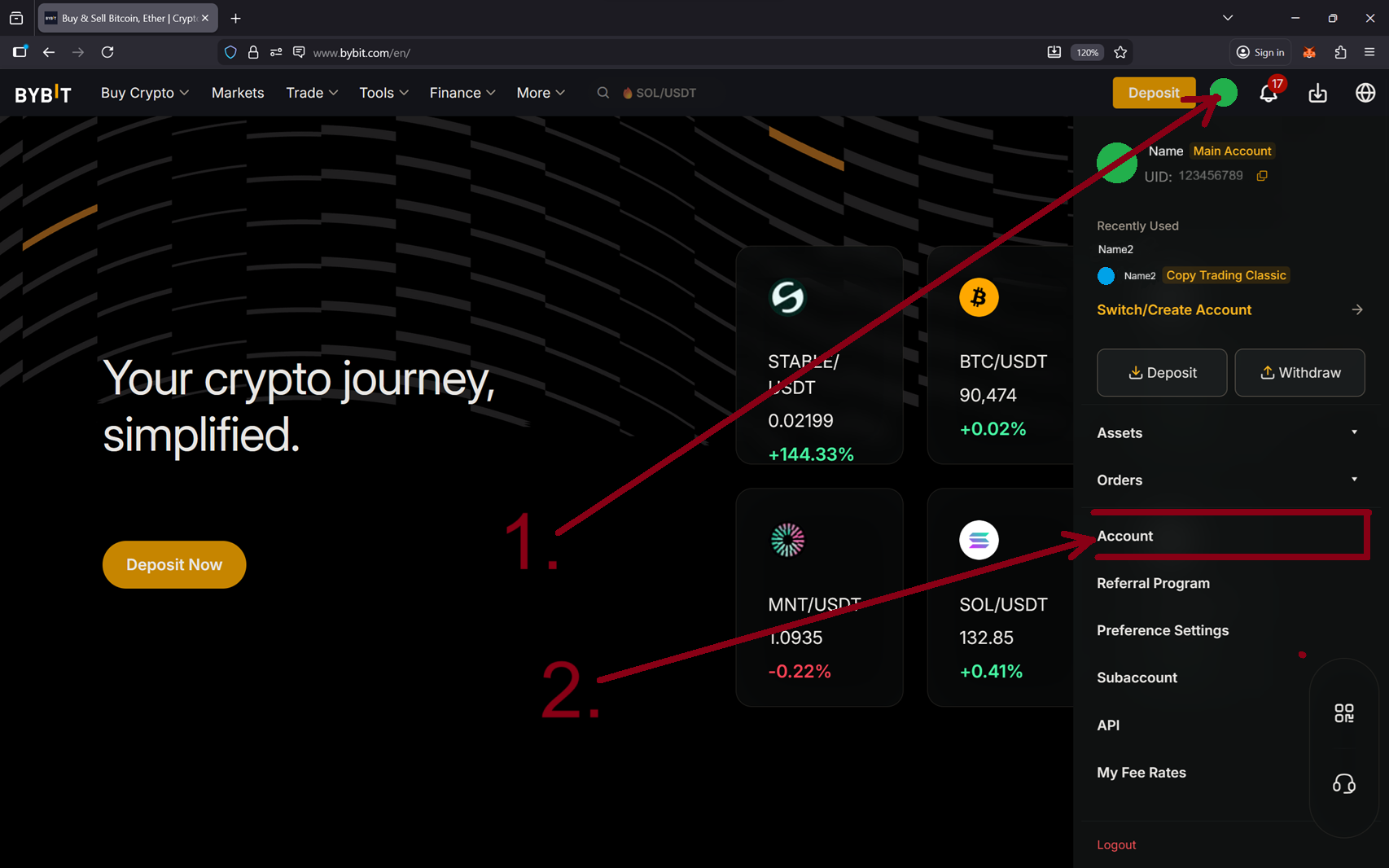
Navigate to Identity Verification
In the Account & Security page, find and click "Identity Verification" in the left sidebar.
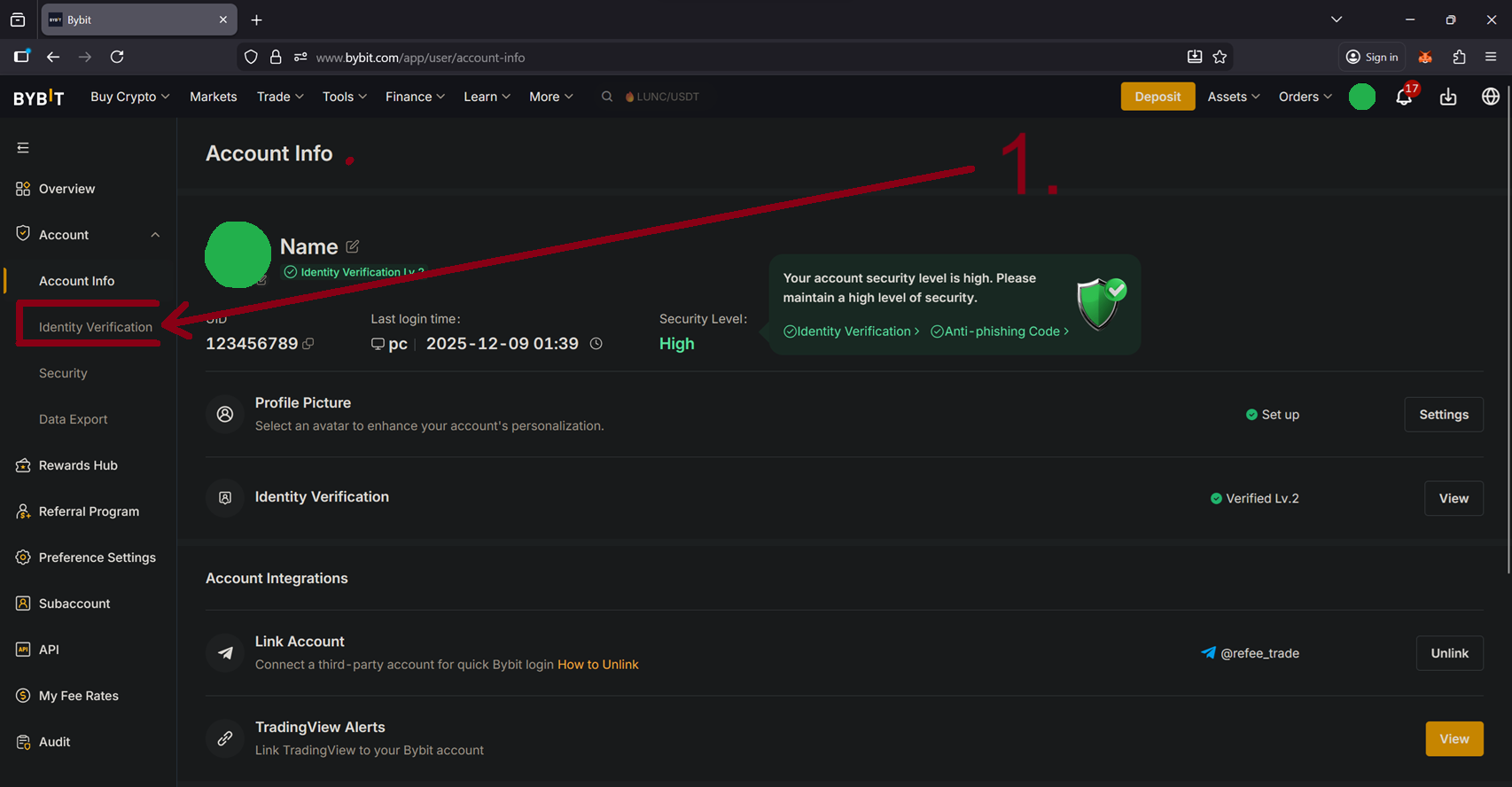
Click "Transfer Identity"
On the Identity Verification page, look for the "Identity Transfer" button in the top-right corner of the verification card.
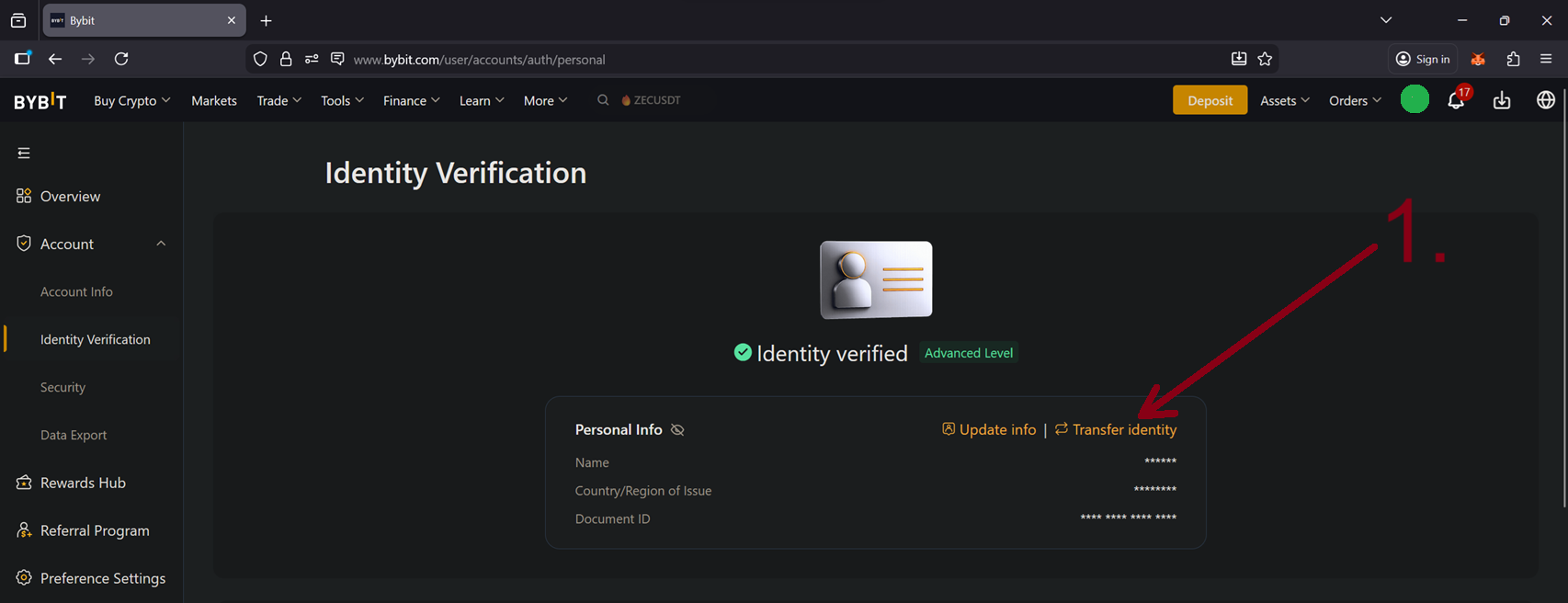
Complete Security Verification
Bybit will ask you to verify your identity before proceeding. This may include:
- Facial recognition scan
- Google Authenticator code
- Email/SMS verification code
Follow the on-screen prompts to complete verification.
Enter New Account Details
A popup will appear asking for your new account's credentials. Enter the email address or phone number you used to register the new account.
Read and accept the transfer terms, then click "Continue" or "Next".
Confirm and Complete Transfer
Bybit will send a verification code to your new account's email or phone. Enter this code to confirm the transfer.
Once verified, you'll see a success message confirming the transfer is complete.
After the Transfer
Congratulations! Here's what happens next:
Log into your new account
Your new account now has full KYC verification. You can start trading immediately.
Transfer your funds
The withdrawal restriction lifts. If you withdrew to an external wallet, deposit back into your new account. Or use internal transfer from your old account.
Earn 20% cashback automatically
Every trade you make now earns cashback. Track your earnings in your Re:Fee dashboard.
Troubleshooting
"Identity Transfer" button not showing
- Make sure you're using the desktop website, not the mobile app
- Ensure your account has completed KYC verification
- Wait 24 hours after completing KYC — the button isn't available immediately
- Check if you've already transferred within the last 180 days
"Target account is already verified"
- The new account must be completely unverified
- If you accidentally started KYC, create a fresh account
"Transfer failed" or "Unable to process"
- Check for pending P2P orders on your old account
- Wait 5 days if you recently completed a P2P transaction
- Close all open positions (Spot, Futures, Options)
- Remove any linked payment methods and bank cards
- Ensure no fiat currency remains in the account
- Try again in a few hours if Bybit is experiencing high traffic
Account deactivated and can't log in
- If you've requested self-deactivation and can't log in to perform the transfer
- Submit a support ticket to Bybit for manual assistance
Frequently Asked Questions
If your account is less than 14 days old, you can add a referral code directly in Settings → Referral. For older accounts, you need to transfer your KYC verification to a new account registered with the desired referral code, as described in this guide.
Yes, trading history stays with your old account. Your new account starts fresh. However, your KYC verification level transfers completely, so you won't have reduced limits or need to re-verify.
VIP status is tied to trading volume and doesn't transfer. Your new account starts at VIP 0. However, the 20% cashback from Re:Fee often exceeds VIP fee discounts for most traders.
No, each Bybit account requires a unique email or phone number. You'll need to use a different email for your new account.
Yes, Identity Transfer is an official Bybit feature. It's designed specifically for users who want to change their referral code or consolidate accounts. The process is secure and reversible (after 180 days).
Ready to Start Saving?
Create your new account with our referral code and start earning 20% cashback on every trade.
Create Account with REFEEAlready transferred? Check your cashback dashboard
This guide is based on Bybit's official Identity Transfer documentation. For the most up-to-date information, please refer to Bybit's Help Center.